Community Ingress NGINX retirement: what it means for your Kubernetes strategy.

Community Ingress NGINX retirement: what it means for your Kubernetes strategy.

Kubernetes SIG Network and the Security Response Committee have announced the retirement of the Community Ingress NGINX Controller — a decision that will impact a large part of the Kubernetes ecosystem. 

“Best effort” maintenance will continue until March 2026. After that, the project will no longer receive updates, bug fixes, or security patches. 

While existing deployments will continue to run, they will do so without any security or support guarantees — raising important questions for organizations relying on it in production. 

What is changing — and why it matters.


Ingress NGINX has long been a core component for exposing Kubernetes applications. 

From March 2026 onward, the Community Ingress NGINX project will no longer receive: 

  • security patches  
  • vulnerability remediation (CVE fixes)  
  • functional updates  

Kubernetes SIG Network recommends starting a migration now, either toward the Gateway API or another supported Ingress controller. 

From a security and governance perspective, continuing to run an unmaintained component introduces increasing risk over time. 

No immediate disruption — but increasing risk.


It’s important to clarify:
applications will not suddenly stop working in March 2026. 

However, the situation will evolve progressively: 

  • no future vulnerabilities will be fixed  
  • compatibility with future Kubernetes versions becomes uncertain  
  • security teams lose visibility and control  

For critical, exposed, or regulated environments, this quickly becomes a strategic decision — not just a technical one. 

What are your options?


Organizations essentially have two main paths. 

  1. Move to the Kubernetes Gateway API

The Gateway API is the long-term direction recommended by Kubernetes. It brings: 

  • role-oriented architecture  
  • standardized APIs  
  • improved portability  

Many implementations already exist: https://gateway-api.sigs.k8s.io/implementations/ 

That said, this is a significant architectural shift, which can be complex for existing environments. 

  1. Adopt a supported Ingress alternative

Community Ingress NGINX is not the only Ingress Controller available. 

Several actively maintained alternatives exist, including those listed by Kubernetes: https://kubernetes.io/docs/concepts/services-networking/ingress-controllers/ 

For teams already using NGINX, F5 NGINX Ingress Controller (OSS) offers a natural and sustainable evolution: 

  • open source (Apache 2.0)  
  • actively maintained  
  • technological continuity  
  • compatible with future Gateway API adoption  

A pragmatic approach to migration.


There is no one-size-fits-all path. 

In practice, successful migrations are: 

  • progressive  
  • controlled  
  • aligned with business and security priorities  

Most organizations benefit from stabilizing their current environments first, securing them properly, and then planning a gradual transition. 

What should you do next?


If you are: 

  • running Kubernetes or OpenShift in production  
  • evaluating Gateway API  
  • or looking to reduce your security exposure  

Now is the right time to assess your situation and define a clear migration strategy. 

e-Xpert Solutions’ SOC Achieves ISAE 3000 Attestation.

e-Xpert Solutions’ SOC Achieves ISAE 3000 Attestation.

e-Xpert Solutions’ SOC Achieves ISAE 3000 Attestation.

We are proud to announce that we has obtained the ISAE 3000 attestation for its Security Operations Center (SOC), issued by Deloitte. This independent assurance confirms that the SOC operates with robust, continuously applied controls across critical domains, from governance and technical security to client isolation, access management, traceability, documentation, and operational quality.

What ISAE 3000 Means

Unlike typical certifications, ISAE 3000 requires auditors to verify real operational evidence—not just policies or intentions—any day within the past 12 months. The audit focuses on consistent, daily execution of controls, making this attestation a true reflection of operational excellence, not a one-time achievement. e-Xpert Solutions is currently the only SOC in Western Switzerland to hold this level of assurance.

The Scope of the Attestation

The SOC successfully demonstrated 19 critical controls, covering areas that matter most to CISOs:

  • Access governance: strict and traceable controls over user access
  • SOC/client isolation: verified and automated separation between internal and client systems
  • Monitoring and detection: advanced tools, including custom attack simulations and new IDS sensors
  • Operational quality and processes: resilient internal processes, continuous improvement, and thorough documentation
  • Traceability and recording: full visibility into all SOC and client activities

Achieving this required a combination of deep technical upgrades, rigorous process management, and meticulous documentation.

What This Means for you, Our Clients

For clients, the ISAE 3000 attestation provides an unprecedented level of transparency and assurance. It validates that the SOC doesn’t just define security practices—it executes them, maintains them, and proves them every day.

The Teams Behind the Achievement

This milestone would not have been possible without the dedication, expertise, and perseverance of the SOC team, supported by compliance, HR, technical, and management colleagues. Every individual’s contribution—from designing and implementing technical controls to ensuring documentation, reporting, and quality—was essential.

Thank you to all involved. This attestation reflects your work, your rigor, and your commitment to operational excellence.

The Managed SOC Service “At-Defense” by e-Xpert Solutions

Der Managed SOC-Service „At-Defense“ von e-Xpert Solutions

Cybersicherheit ist längst kein Luxus mehr – sie ist eine überlebenswichtige Notwendigkeit. In der Schweiz explodieren die Cyberangriffe: Über 2.700 Unternehmen wurden innerhalb eines Jahres Opfer von Ransomware-Attacken, und ein Drittel der KMUs wurde 2021 angegriffen. Angesichts dieser wachsenden Bedrohung bietet das Genfer Unternehmen e-Xpert Solutions, seit über 20 Jahren auf Cybersicherheit spezialisiert, eine proaktive Verteidigungslösung: AT-Defense, ein Managed Security Operations Center (SOC), das auf die heutigen Herausforderungen zugeschnitten ist.

Warum AT-Defense wählen?

Rund-um-die-Uhr-Überwachung (24/7)

Dank eines engagierten Teams von Sicherheitsexperten bietet AT-Defense eine Echtzeit-Erkennung von Bedrohungen, sofortige Reaktion auf Vorfälle und ein umfassendes Krisenmanagement. Der Service ist durchgehend aktiv, mit einer garantierten Reaktionszeit von weniger als einer Stunde im 24/7-Modus.

Offensive und defensive Expertise

Das SOC stützt sich auf ein interdisziplinäres, zertifiziertes Team (GCIH, GCFA, GREM), das sowohl in Incident Response als auch in forensischer Analyse, Threat Hunting und Schwachstellenforschung erfahren ist. Die Experten von e-Xpert Solutions sind zudem anerkannte Mitwirkende in der Cybersicherheits-Community (MITRE ATT&CK, Publikationen, usw.).

Schlüsselfertiger Managed Service

Mit einer schnellen Integration (2 Tage vor Ort), intuitiven Dashboards über Splunk, zentralisiertem Log-Management, Honeypots, Darknet-Leak-Erkennung und wöchentlichen Berichten setzt AT-Defense auf Einfachheit und Effizienz. Dies alles wird durch strenge Qualitätskontrollen ergänzt (False-Positive-Überprüfung, Vier-Augen-Prinzip).

Reduzierung der operativen Belastung

Durch das Outsourcing der Sicherheitsüberwachung entlasten Unternehmen ihre internen Teams und behalten gleichzeitig über ein individuelles Überwachungsportal die volle Kontrolle.

ISO 27001-zertifizierte Lösung

Unser SOC ist seit 2021 nach ISO 27001 zertifiziert – ein Garant für die Einhaltung höchster internationaler Standards in der Informationssicherheit.

Spitzentechnologie und anerkannte Kompetenz

AT-Defense setzt auf führende Technologien: Echtzeit-Korrelation von Ereignissen mit SIEM, Honeypots zur Täuschung von Angreifern, fortschrittliche Sensoren, Threat Hunting und vieles mehr.

Hinter der Infrastruktur steht ein Team von 10 zertifizierten Sicherheitsexperten (GCIH, GCFA, GREM), das für ein hohes Überwachungsniveau sorgt – gestützt auf ihre Erfahrung in offensiver und defensiver Sicherheit sowie ihre anerkannten Beiträge (MITRE ATT&CK, Veröffentlichungen, Konferenzen…).

Agil, schnell und passgenau reagieren

✔️ In nur 2 Tagen mit Vor-Ort-Unterstützung einsatzbereit
✔️ Reaktives SLA mit Reaktion in unter einer Stunde (24×7)
✔️ Einfache Integration in bestehende Kundenumgebungen
✔️ Skalierbare Services: IRaaS, Managed XDR, Advanced Detection, u. v. m.

Warum e-Xpert Solutions?

e-Xpert Solutions, ein unabhängiges Schweizer Unternehmen, wurde 2001 gegründet und ist bekannt für seine Servicequalität und sein starkes Engagement für Cybersicherheit. AT-Defense ist das beste Beispiel für diese Vision: eine zuverlässige, kompetente und schnell implementierbare Lösung – mit kontrollierten Kosten, minimalem internen Aufwand und einem hohen Schutzniveau.

Forcepoint DLP – Endpoint application detection on the new TEAM Apps

Forcepoint DLP – Endpoint application detection on the new TEAM Apps

Forcepoint DLP – Endpoint application detection on the new TEAM Apps

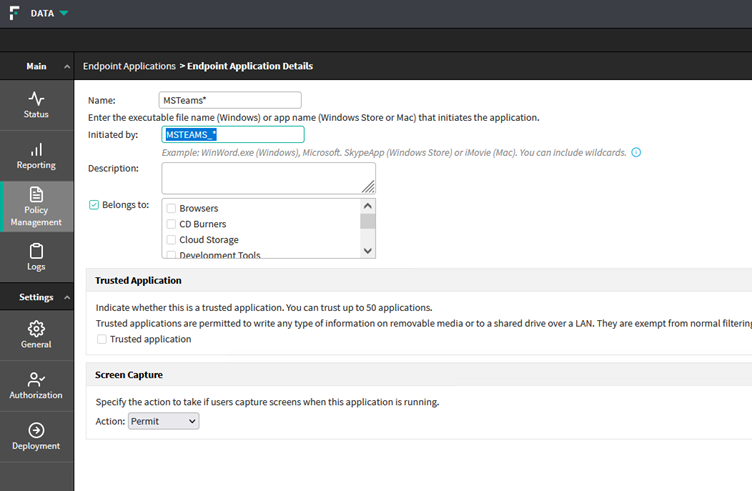
À la suite de la nouvelle version de l’application TEAMS mise en place par Microsoft ces dernières semaines, la détection DLP par application doit être modifiée dans votre configuration pour rester valable dans le cas où vous l’utiliseriez.

Exemple de la nouvelle version de TEAMS :

C:\Program Files\WindowsApps\MSTeams_23285.3604.2469.4152_x64__8wekyb3d8bbwe

Le nom de l’exécutable ayant été modifié, il est nécessaire d’ajouter un nouveau processus manuellement dans les « Endpoint Application »

Veuillez ajouter l’entrée suivante pour réactiver la protection :

 « MSTEAMS_* »


Il est nécessaire de mettre ce wildcard pour que le processus DLP intercepte correctement les actions de « Copier/couper/coller » et « File Access »

Ensuite, il suffit d’ajouter ce nouvel objet dans un « Endpoint Application Group » puis, de configurer ce groupe dans chaque Policy utilisant ce chemin de fuite.

AWS Connexion à une instance EC2 – Partie 4: EC2 Instance Connect Endpoint

AWS Connexion à une instance EC2 – Partie 4: EC2 Instance Connect Endpoint

AWS Connexion à une instance EC2 – Partie 4: EC2 Instance Connect Endpoint

omment se connecter à une instance EC2, privée ou publique, de façon sécurisée depuis internet.

Qu’est-ce que AWS EIC Endpoint ?

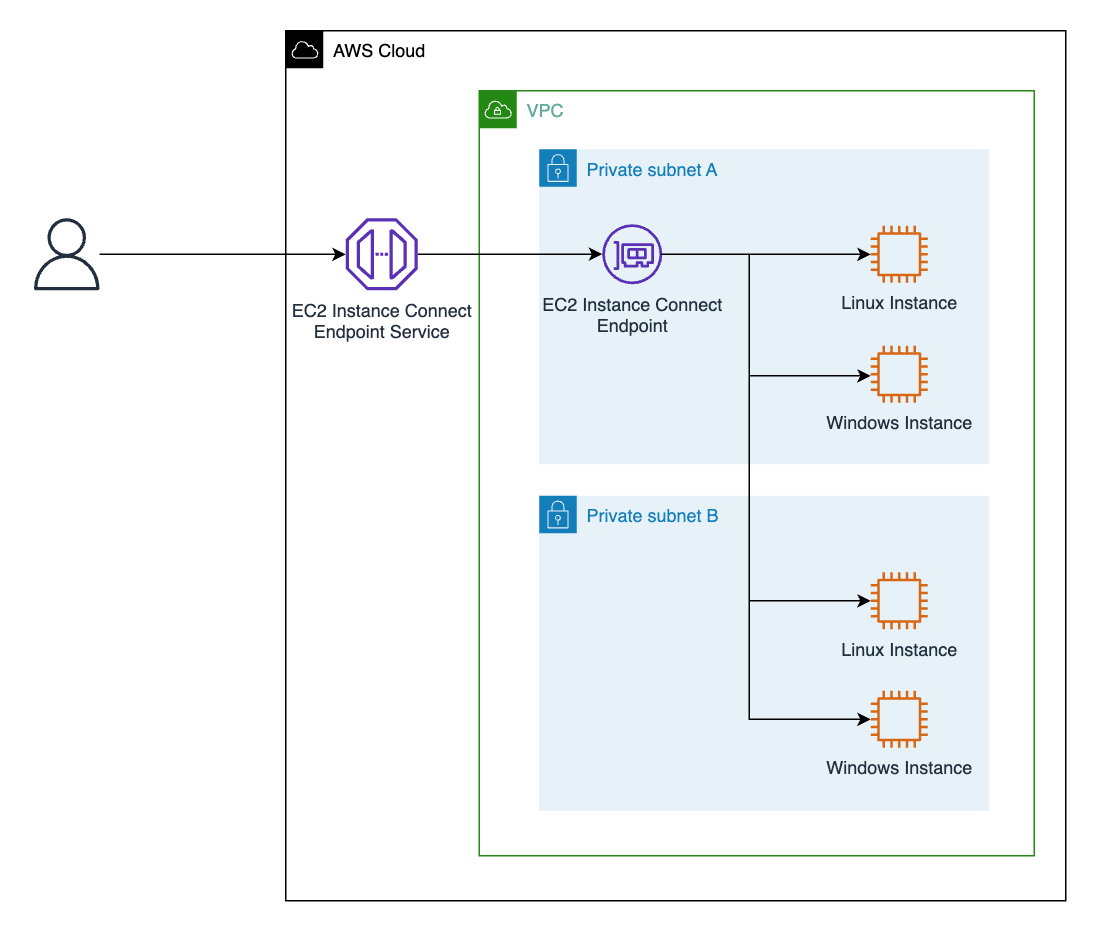
EIC Endpoint est un Identity-aware TCP proxy (IAP), permettant de contrôler l’accès à vos machines. Grâce à lui, vous pouvez établir directement une connexion à toutes les instances de votre VPC, même les privées (sans IP publique). Ils n’exigent pas que votre VPC dispose d’une connectivité Internet directe à l’aide d’un IGW ou d’une passerelle NAT, aucun agent n’est nécessaire sur la ressource à laquelle vous souhaitez vous connecter, ce qui facilite le management notamment pour les architectures hybrides. Et enfin, ils préservent les flux de travail existants, ce qui vous permet de continuer à utiliser votre logiciel client préféré sur votre poste de travail local pour vous connecter et gérer vos ressources. En termes de sécurité, IAM et les groupes de sécurité peuvent être utilisés pour contrôler l’accès, et l’authentification et l’autorisation sont évaluées avant que le trafic n’atteigne le VPC.

Les étapes pour utiliser EIC Endpoint

Depuis la console
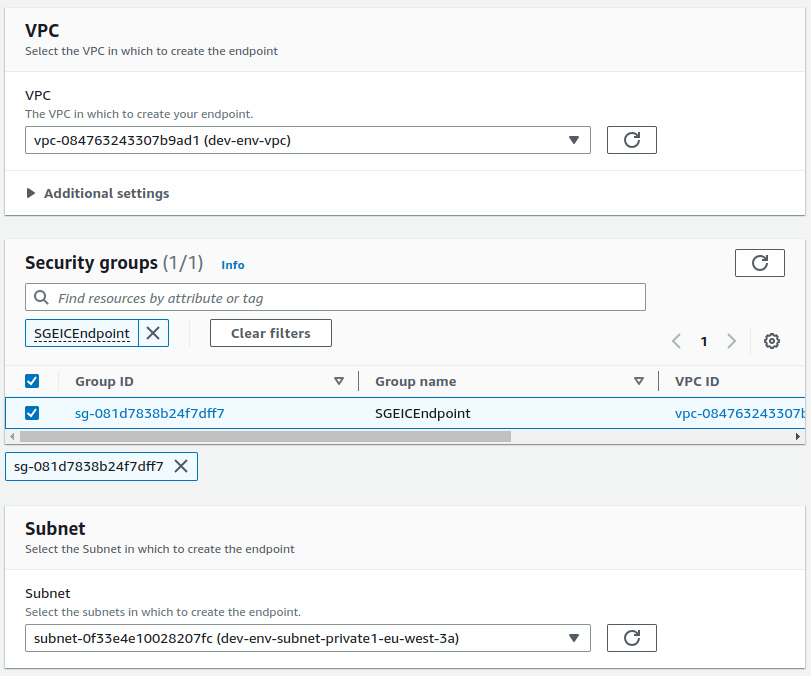
Créer/éditer le groupe de sécurité (security group) qui sera associé au EIC Endpoint

Règle entrante: aucune règle n’est nécessaire.

Règle sortante: ouvrir le port de connexion (ex: 22 pour SSH (linux) – 3389 pour RDP (windows) etc…) avec pour destination le groupe de sécurité de la/des instance(s), afin de permettre la connexion.

Créer/éditer le groupe de sécurité (security group) de la/des instance(s)

Règle entrante: ouvrir le port de connexion (ex: 22 pour SSH (linux) – 3389 pour RDP (windows) etc…) avec pour destination le groupe de sécurité du EIC Endpoint.

Règle sortante: aucune règle n’est nécessaire.


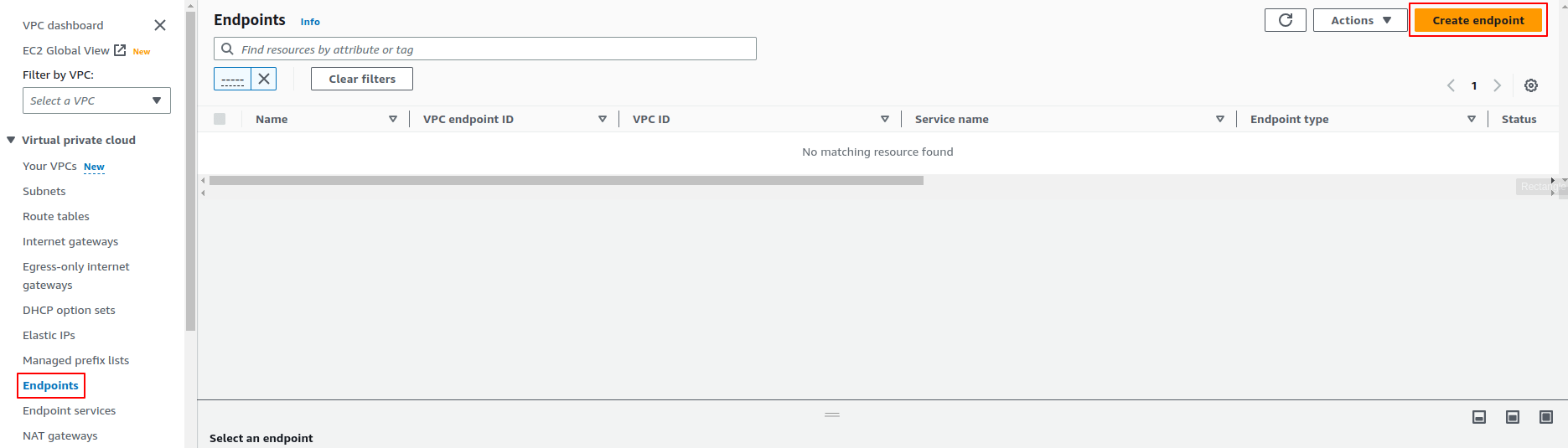
Créer l’EIC Endpoint

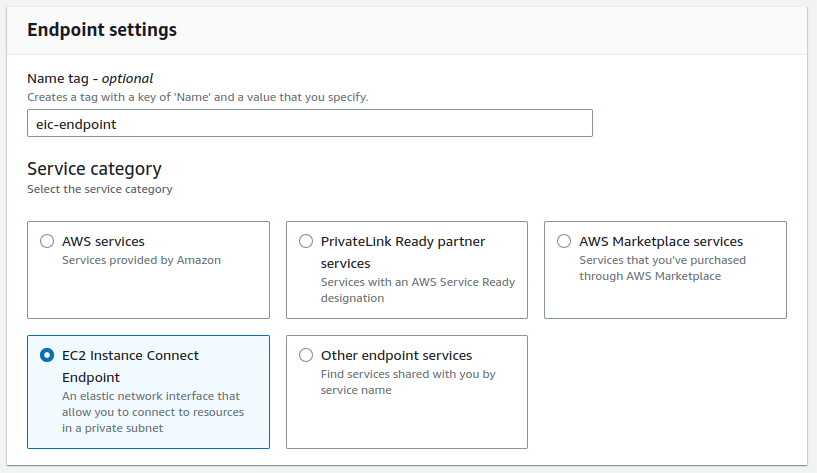
VPC -> Endpoint -> Create Endpoint

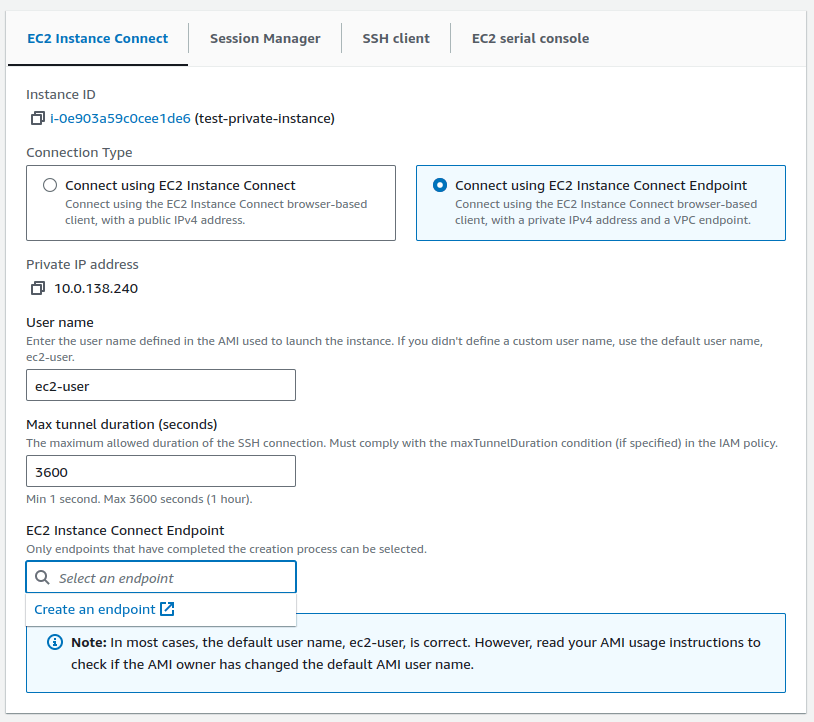
Instance EC2 -> Connect -> EC2 Instance Connect -> Connect using EC2 Inctance Connect Endpoint -> EC2 Instance Connect Endpoint -> create an endpoint.

La création est très simple, il suffit de sélectionner le VPC, Secuity group et le subnet.

Connexion à l’instance

Pour toutes les Instance du VPC, ayant le groupe de sécurité bien configuré:

Connect -> Connect using EC2 Instance Connect Endpoint laisser les valeurs par défauts et sélectionner le EIC Endpoint.

En CLI

Création de l’EIC Endpoint

Une fois les groupes de sécurité configuré, créer l’EIC Endpoint:

aws ec2 create-instance-connect-endpoint \

–subnet-id [SUBNET] \

–security-group-id [SG – ID]

Connexion à l’instance

aws ec2-instance-connect ssh –instance-id [INSTANCE]

Dans l’exemple ci-dessous, nous utilisons l’EIC Endpoint en combinaison avec EC2 Instance Connect pour la gestion des clés SSH. Il est bien sûr tout à fait possible d’utiliser des clés SSH que l’on a générées préalablement.

Ces informations sont correctes au moment de la rédaction de l’article, cependant, il est important de noter que les services AWS évoluent constamment. Il est possible que certaines fonctionnalités, noms, etc. soient différents ou aient changé depuis lors.

de_DE